Your Company's AI Work Shouldn't Live on Someone's Laptop
People were building great AI workflows on their own. My boss asked what happens when they leave. The answer was one company platform with a harness around it.

My boss and I were talking about how people at the company were using AI. The news was good. People had started building useful workflows on their own: a check here, a report there.
Then he asked the question that matters: what happens to all of that when they leave?
The honest answer was that it leaves with them. A workflow built in a personal AI chat, or in scripts on someone's machine, belongs to that person in every practical sense. Nobody else can find it, run it, fix it or improve it. We can't share it with the next team that needs the same thing, and we can't see what it costs or whether anyone still uses it.
I'd been running AI agents on Multica, a self-hosted platform where you assign work to coding agents the way you assign it to a teammate, for a while. The answer clicked right away. Don't ask people to stop building. Give them one company place to build in, and put a harness around it: the controls around the agents that make the platform safe to hand to people outside IT.
The work people build with AI should belong to the company, not to the laptop it was built on.
This is Part 1 of two: why we built what I call the AI Factory, and what it changed. Part 2 covers how it's built, piece by piece.
Two kinds of automation
It's easy to confuse this with the agentic workflows a company already runs, built in workflow-automation tools like n8n. We have those too, and they're the right tool for a different job.
- Company workflows handle the critical, repeatable processes: approvals, auditing customer data, anything where the same steps must run the same way every time.
- The AI Factory makes people productive, case by case. One team needs a weekly check of something nobody else cares about. Another wants a report that joins three sources in a way only they think about. Those requests are too small and too specific to go through an IT project, and too useful to ignore.
The second kind is where AI changes the economics. Now the person who has the problem can describe it to an agent and get a working tool.
What the factory is
The AI Factory is a platform that people outside IT use to build their own workflows and reports. Reports are the first step.
Each team has its own workspace. Someone describes what they need in plain language, the way they'd write a request to a colleague. An agent that already knows how the factory works breaks the request into steps and hands them to specialist agents: one writes the code that pulls the data, one builds the report page, and the request ends with a schedule. The person checks the result and asks for changes the same way.
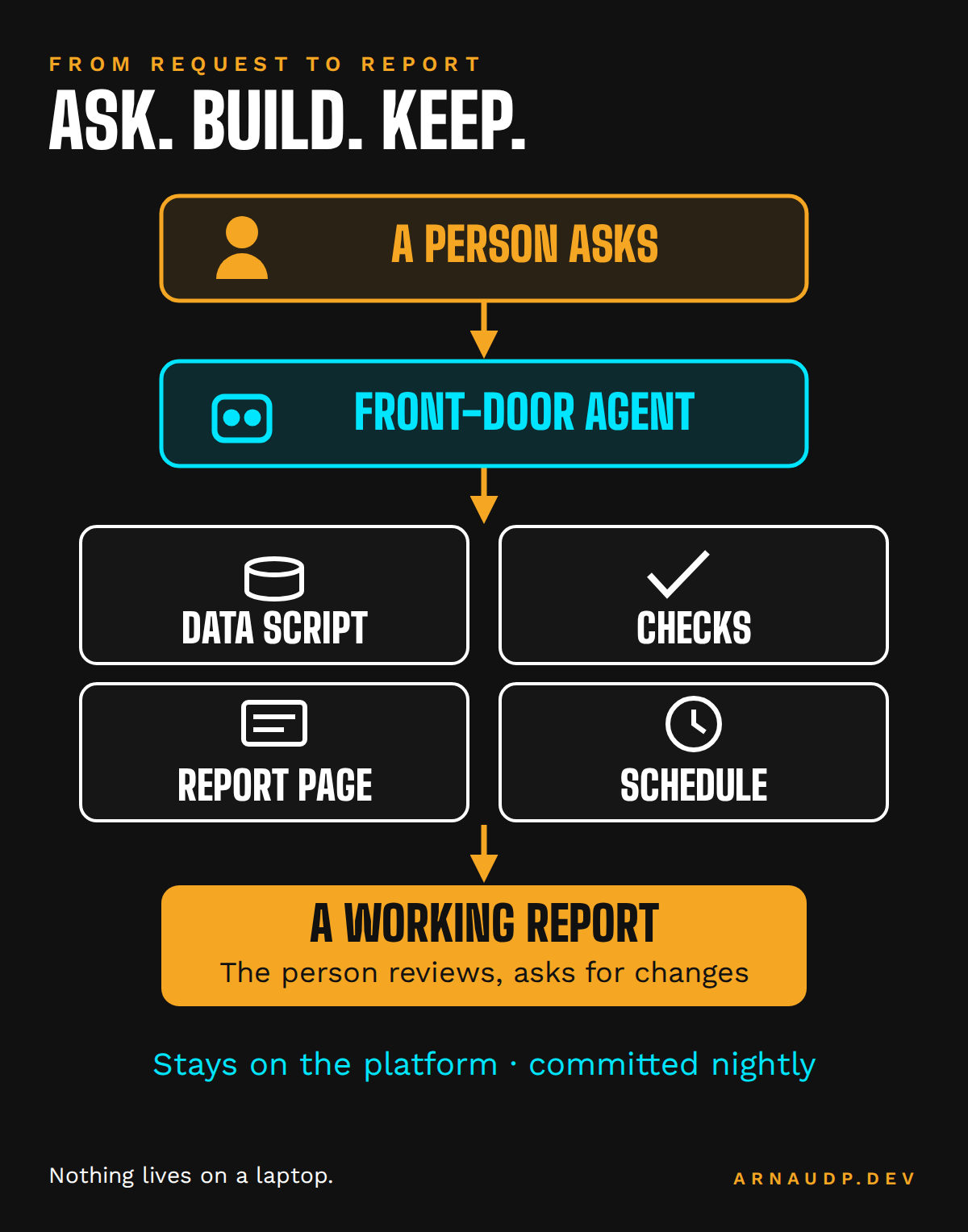
Everything stays on the platform: the request, the agents' work, the code they wrote, the report and the run history. Every night, the code and the reports are committed to source control. When someone leaves, the report they asked for keeps running, and the next person can read exactly how it was built and change it.
Every report page has a chat built in, with two modes. In Ask, anyone who can open the report can question it: what's new this week, which problems matter most. The Ask agent is read-only and refuses to change anything. In Edit, a named editor asks for a change to the report itself, and an editor agent makes it and publishes it.
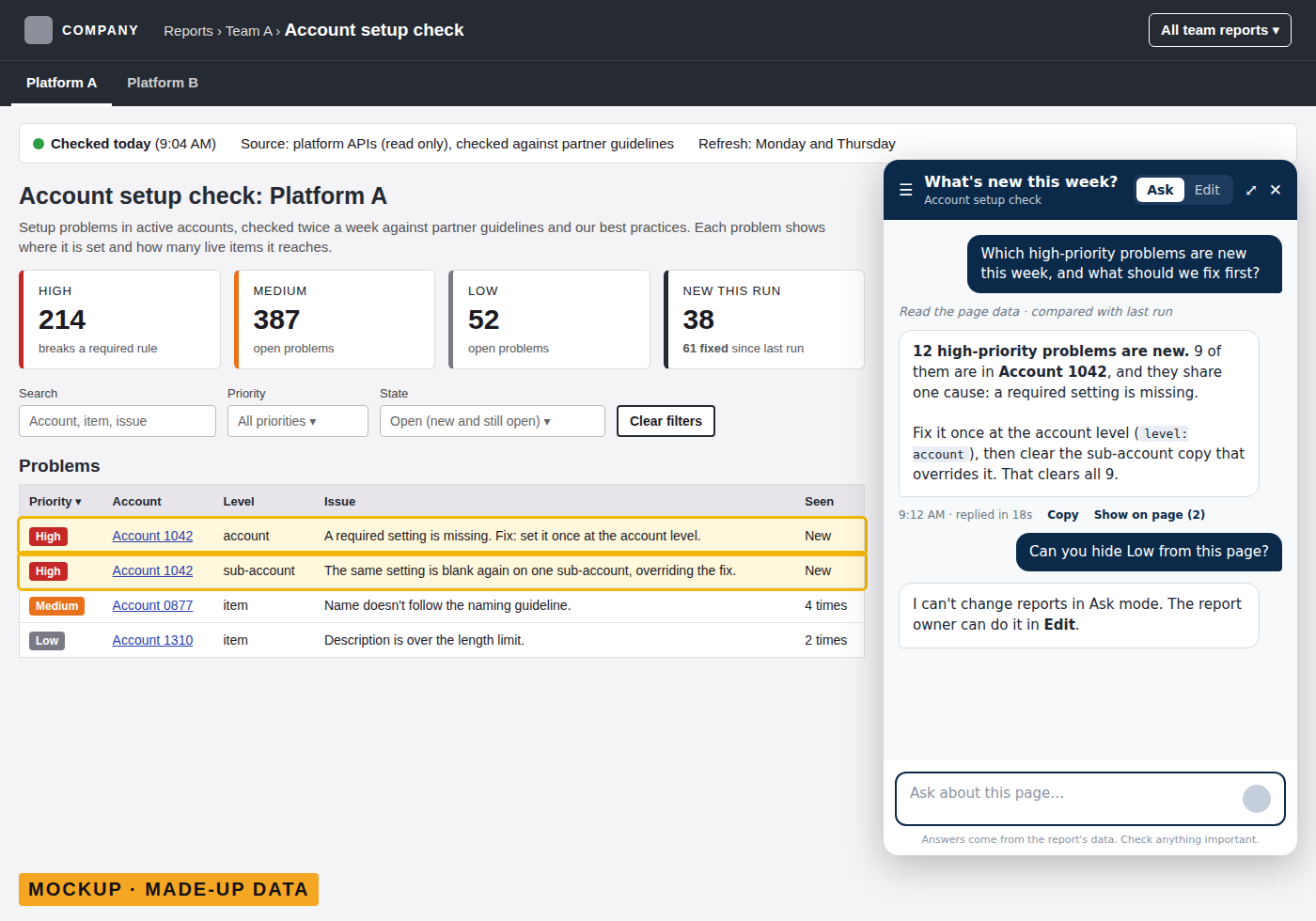
Today only a few people can edit. The plan is a sandbox where anyone can build their own workflow, then publish it to their team once a team lead or IT approves it.
One report, start to finish
One example shows how it works. A colleague on a business team wanted a regular check of how a few hundred accounts on an external platform were set up, against partner guidelines and our own best practices, with every problem ranked by priority.
He described it in a request. The agents built it in four steps: scripts that pull the account setup, a check that applies the rules, a report page, and a schedule. The first results came back within the hour, the report page was live the same afternoon, and his team started using it the next day. The first run found thousands of problems, ranked so the team knew where to start. Changes after that, like narrowing the check or running it twice a week, were more requests, not more projects.
Built the conventional way, with an engineer writing the integrations, the rules and the page, and testing them, I estimate the same tool would have taken at least two weeks. And it would have been one more thing in IT's backlog instead of something his team could ask for directly.
The harness
Handing AI to people outside IT is only safe if the platform around the agents does the governing. Prompting well is not a control. These are the pieces of our harness:
- Company sign-in. People open reports with their company Microsoft account. When someone leaves and their account is closed, their access ends with it.
- Read-only data. Every connection the agents use can read data and nothing else. An agent can read an account but can't change anything in it.
- Usage per team. We see which reports are opened and by which team, so we know what is used and what isn't.
- Agents that carry the house rules. The agents carry the house rules: where data goes, how a report is built, how a schedule is set up. The person asking doesn't need to know any of it.
- No reinvented wheels. The agent platform already keeps every request, every run and every agent comment. We don't rebuild that. We added only what it doesn't give us.
Why it's cheap: make the AI write scripts
The trick that made the cost work was simple. The AI doesn't fetch data. It writes a script that fetches the data, and the script runs on a schedule.
An agent that gathers data by itself, page by page and call by call, spends tokens on every step, every day. A script costs nothing to run again. The AI's job is to process the data and write it in a format the report understands.
When a report needs judgment, the script sends the whole batch to the model in one call, and the model returns only the problems. Items that haven't changed keep their last result, so the next day only new items go to the model. Exact rules, like a required value or a naming pattern, are checked in code, which gives the same answer every time and costs nothing.
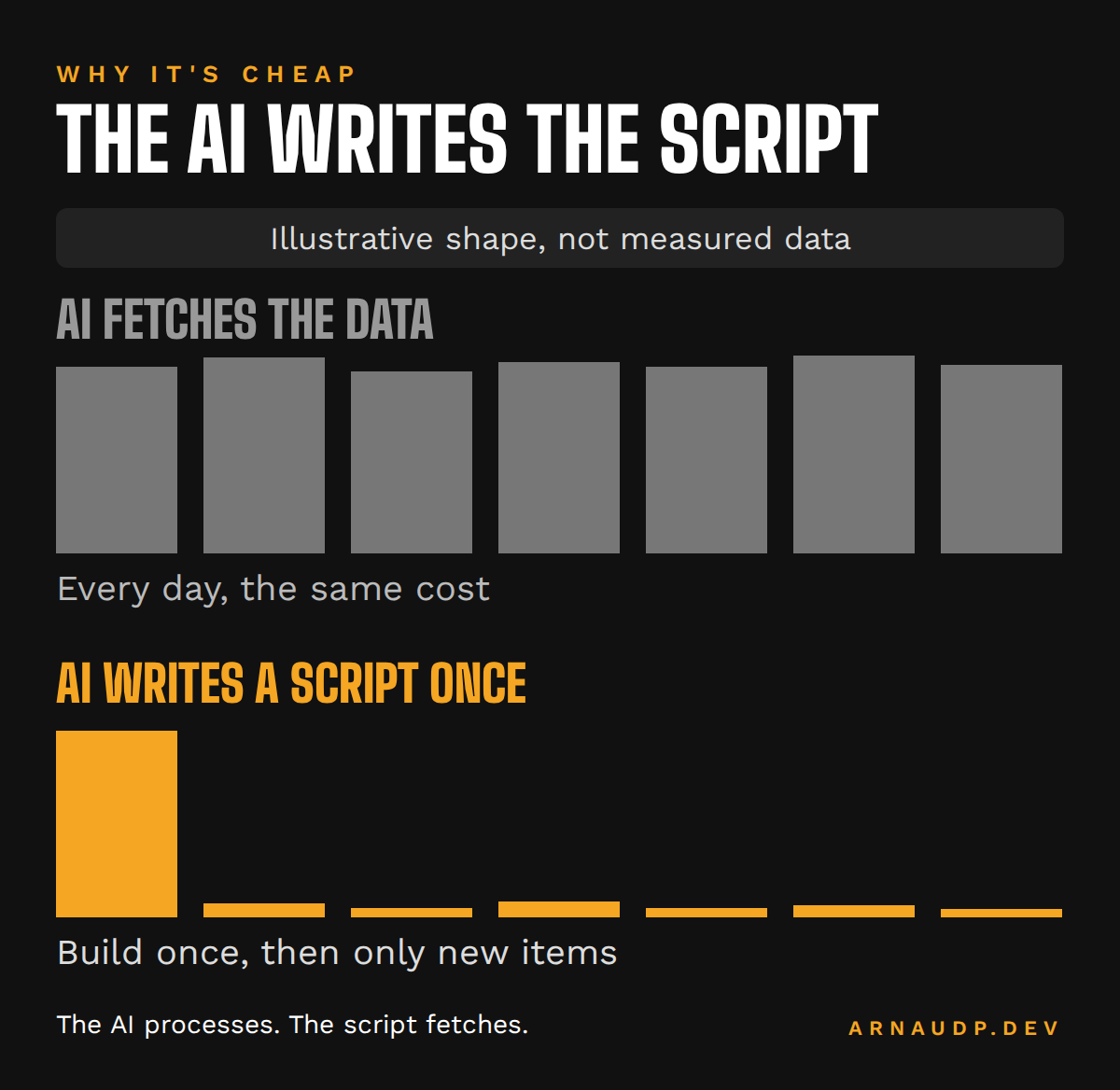
One example: a daily check of the links in our live content. The first full review cost well under a dollar. Today it covers a few thousand links, and on the day I checked, only about a dozen were new, so the run cost a few cents.
The factory now checks more than ten thousand web pages and reads thousands of external accounts. When I last looked, on a Friday, we had used about 10% of the AI subscription's weekly limit. That's one check, not an average.
What's next
Read-only is the first step. Some workflows will need to change things, and when they do, the agents still won't get write credentials. Every write will go through an API layer we control: nothing allowed by default, only narrow actions, and every call traced and audited. The point is that an AI can't delete everything by accident.
Further out, people could bring their own AI subscription, or have their own personal site on the platform.
What I don't know yet
This can turn chaotic. When anyone can build a report, you get many reports, some of them overlapping and some of them forgotten. Usage per team is the first tool for that: a report nobody opens is a candidate for retirement. We'll probably need regular retrospectives too.
The pilot also has limits I accepted on purpose. Today the agents run on one shared AI subscription and one shared machine, which is fine for a couple of users. Before more people join, each needs their own subscription.
The bigger question isn't technical. The hard part of building a good report is knowing what you want: bringing a problem, and being able to describe it. It's too early to say who will be good at that. My gut says we'll get a few power users and that most people will use what others build, because they have to. If that's true, it's still a good outcome. The power users' work stays with the company.
Which is the answer to my boss's question. When the person who asked for that report leaves, it keeps running on Monday morning, and whoever takes over can read how it was built.
In Part 2, I'll go through how it's built, piece by piece: the database, the nightly commit to source control, backups, sign-in and the report design rules.