Turning Architecture Into a Prompt Pipeline
How to build a reproducible architecture pipeline with Claude Code slash commands, hard gates, and input chaining. Step-by-step anatomy of one command.

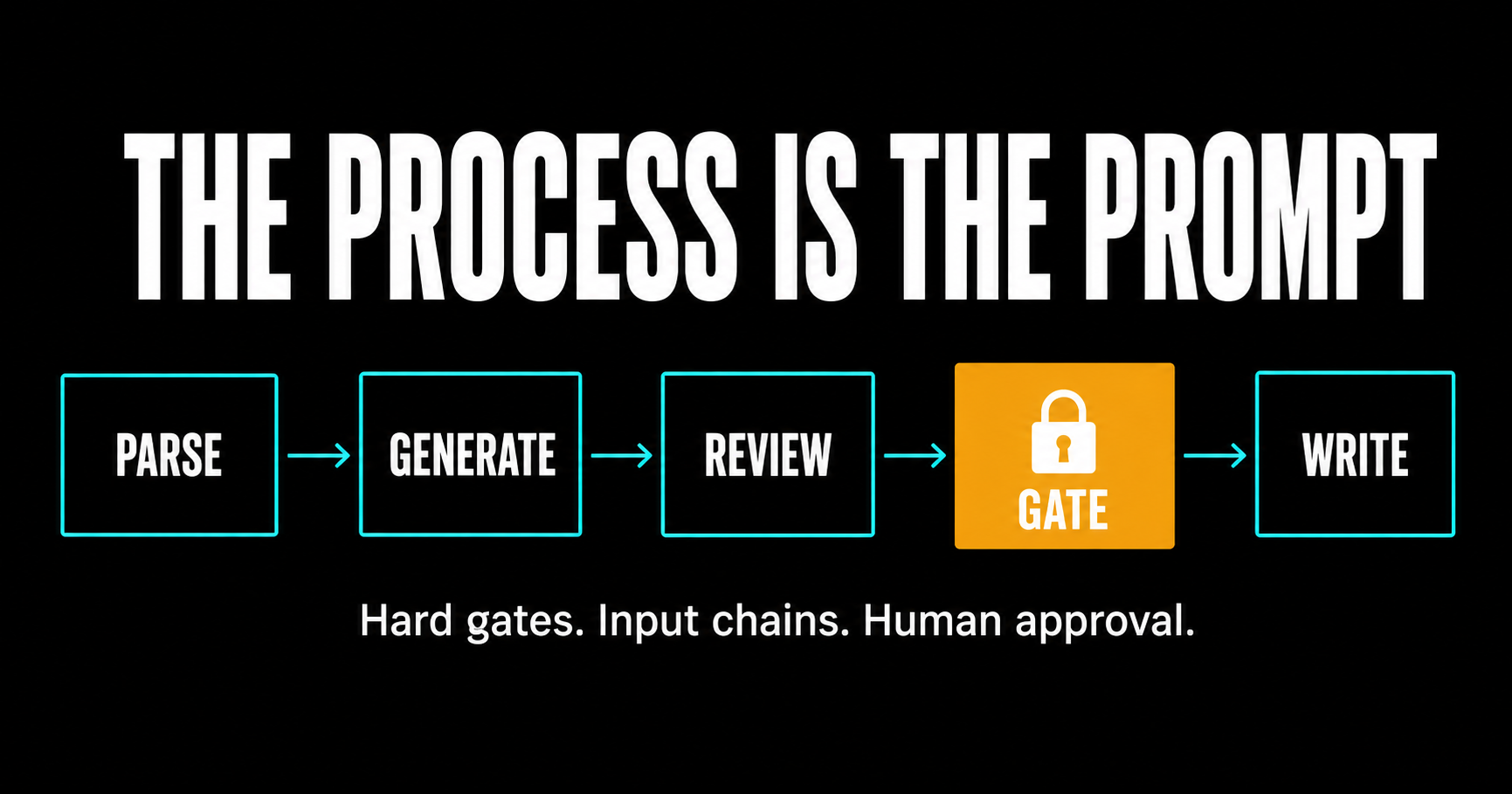
Part 1 described what gets produced and in what order: requirements feed event storming, event storming feeds bounded contexts and aggregates, those feed RFCs, ADRs, C4 diagrams, and backlog items. This part covers how each step actually runs.
There are two failure modes for AI-assisted architecture docs.
The first: the architect pastes requirements into a chat window and asks the AI to produce event storming output. The AI generates confidently. The architect reads through it, says "looks reasonable," and moves on. Three steps later, two bounded contexts are wrong because nobody checked whether the domain events actually traced back to requirements.
The second: the architect decides AI can't be trusted for this work and produces everything manually. Which works, until the process depends on one person's discipline to remember all 22 steps with no skips.
Both failures are process problems, not model problems. The first has no review. The second has no structure.
What I run is a pipeline where the AI proposes, I approve, and a hard gate enforces the sequence. This article walks through exactly how one command is built so you can reproduce it.
The folder structure
The 22-step workflow lives in .claude/commands/, organized into five subfolders:
.claude/commands/
├── discovery/
├── design/
├── quality/
├── publish/
└── delivery/
Each command is a Markdown file. Each file is a Claude Code slash command. The whole pipeline is version-controlled in the repo. You can diff the commands. You can see when you added a rule and why.
There is also a CLAUDE.md at the repo root. It sets the role and project conventions that every command inherits. The role line matters: "You are a peer Architect in a co-working session, not an assistant taking orders." That framing changes how the AI pushes back when something looks wrong.
One more file: arch-workflow.md at the root. Run /arch-workflow ProjectName and it reads workflow-status.md, finds the first incomplete step, and prints the command to run next. It doesn't decide anything. It reads state and reports. It's a routing table, not a chatbot.
Anatomy of one command
Every command follows the same shape. I'll use arch-es-phase1.md (domain events) to show it. You can copy this pattern into any command you build.
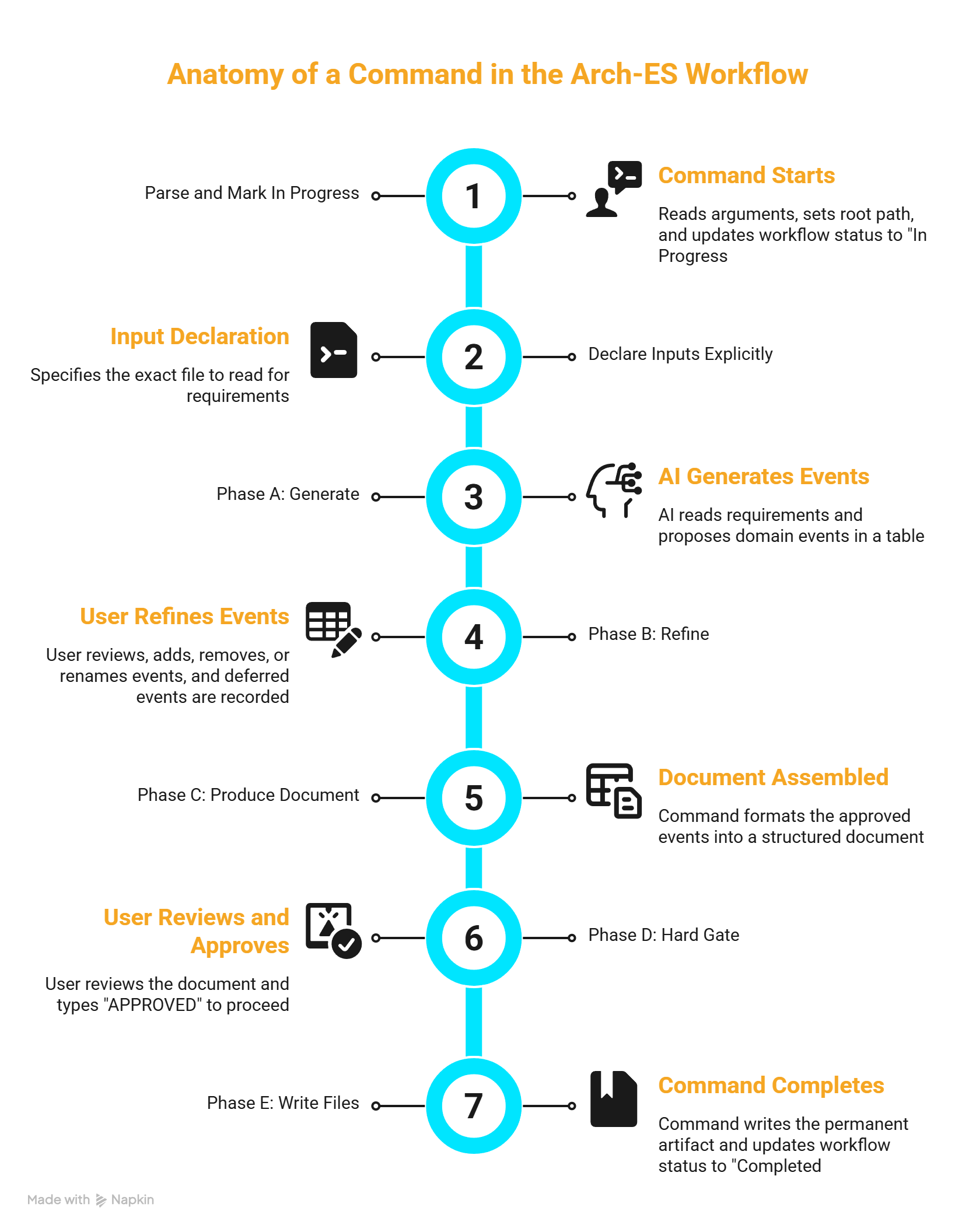
Parse and mark in progress
The command reads $ARGUMENTS for the project name, sets the root path, then immediately marks the step in progress in workflow-status.md:
Update workflow-status.md:
  Step 2.1 Domain Events → 🔄 In Progress
This is the breadcrumb. If the session closes mid-step, the dashboard knows where you left off.
Declare inputs explicitly
Read the following file:
  {PROJECT_ROOT}/requirements.md
The command reads exactly what it specifies, nothing else. Making this explicit does two things: it prevents the AI from pulling in context from earlier in the session, and it makes the dependency chain readable when you come back to the command six months later.
Phase A: Generate
The AI reads each REQ item in the requirements and proposes domain events in a numbered table. Past-tense noun phrases, each traced to a REQ code. Then it asks: "Does this look right? Add, remove, rename anything."
The table format matters. Structured output is easier to check than prose. You want to be able to scan column by column, not parse sentences.
Phase B: Refine
Deferred and removed events are captured explicitly. Nothing disappears from the record. If an event gets cut, the command writes it to a "Deferred Events" section with a reason. When you revisit the document later, you can see what was considered and why it was dropped.
Phase C: Produce the document
After the content is approved, the command assembles output in a defined format: fixed header, summary counts, event table. Same structure every time, across every project. That consistency matters when a later command reads this file as its input.
Phase D: Hard gate
━━━━━━━━━━━━━━━━━━━━━━━━━━━━━━━━━━━━━━━━━━
HARD GATE | Step 2.1: Domain Events Review
━━━━━━━━━━━━━━━━━━━━━━━━━━━━━━━━━━━━━━━━━━
Review the domain events above carefully.

Before approving, verify:
  □ Every REQ is covered by at least one event
  □ All events are past-tense noun phrases
  □ Events are business-meaningful, not technical artifacts
  □ Numbers are sequential with no gaps
  □ Deferred and removed events are captured

When satisfied, reply exactly: APPROVED
━━━━━━━━━━━━━━━━━━━━━━━━━━━━━━━━━━━━━━━━━━
Nothing gets written until you type APPROVED.
Phase E: Write files
After APPROVED, the command writes the permanent artifact and marks the step completed:
Update workflow-status.md:
  Step 2.1 Domain Events → ✅ Completed

Next step → /arch-workflow ProjectName
That's it. Every command in the pipeline follows this shape. The specifics change per step but the structure is always: read, generate, review, gate, write.
Why the gate actually works
Telling an AI "ask me before writing files" is a suggestion. The model can decide the content is ready and proceed. I've seen it happen.
The hard gate works differently: the write instruction is in Phase E, literally after the gate block. The AI cannot write before it reaches Phase E. It can only reach Phase E after the gate clears. That's not prompt engineering. It's sequencing.
The checklist makes the review specific. "Does every REQ have at least one event?" is a different question from "does this look right?" The first forces you to scan the table against the requirements. The second lets you skim.
The gate creates the right moment for human judgment. It can't make you use it. But it makes skipping feel deliberate rather than accidental.
Input chaining
The pipeline works as a coherent system rather than a collection of unrelated prompts because each command declares exactly what it reads:
- Phase 1 reads requirements, produces domain events
- Phase 2 reads requirements + Phase 1 output, produces the event timeline
- Phase 3 reads requirements + Phase 1 + Phase 2, produces policy chains
- Phase 4 reads Phase 3 chains, assigns aggregates
- Phase 5 reads all prior phases, draws bounded contexts
- Phase 6 reads Phase 4 + Phase 5 + requirements, identifies read models
The input chain lives in the command file. If you run Phase 3 before completing Phase 2, the command reads an incomplete timeline. The gate fires and the checklist asks you to verify consistency, but you're checking against a partial foundation.
The pipeline does not protect you from skipping steps. What it does is make the dependency chain visible enough that skipping feels like a choice.
Encoding domain rules
Some commands go further than the basic generate/review/gate/write shape. The policy chain command (Phase 3) has 10 rules encoded into it. These are domain constraints the AI checks itself against before it shows you anything.
The self-validation block runs internally before Phase D:
Self-validate before displaying:
  [ ] Every policy branches from an Event, not from a Command or another Policy
  [ ] No two consecutive Events
  [ ] No two consecutive Commands
  [ ] Actor appears exactly once
  [ ] Policy labels start with "When"
  [ ] All events include their # number
  [ ] Dashed arrows used for prerequisites only
By the time the output reaches the hard gate, the AI has already checked it against the rule set. You review the already-validated version. You can still find logic errors and push back. But you're not manually auditing every edge for rule compliance.
When a rule fires during self-validation, the command surfaces it explicitly: "I flagged a Rule 6 violation while drafting this chain. I resolved it by inserting CMD_IMPORT. Does the inserted command look right?" That's a decision point that would otherwise be buried in generated output.
Encoding rules this way turns architecture judgment into something reproducible. The rules live in the command file. They're version-controlled. You can diff them.
Building your own command
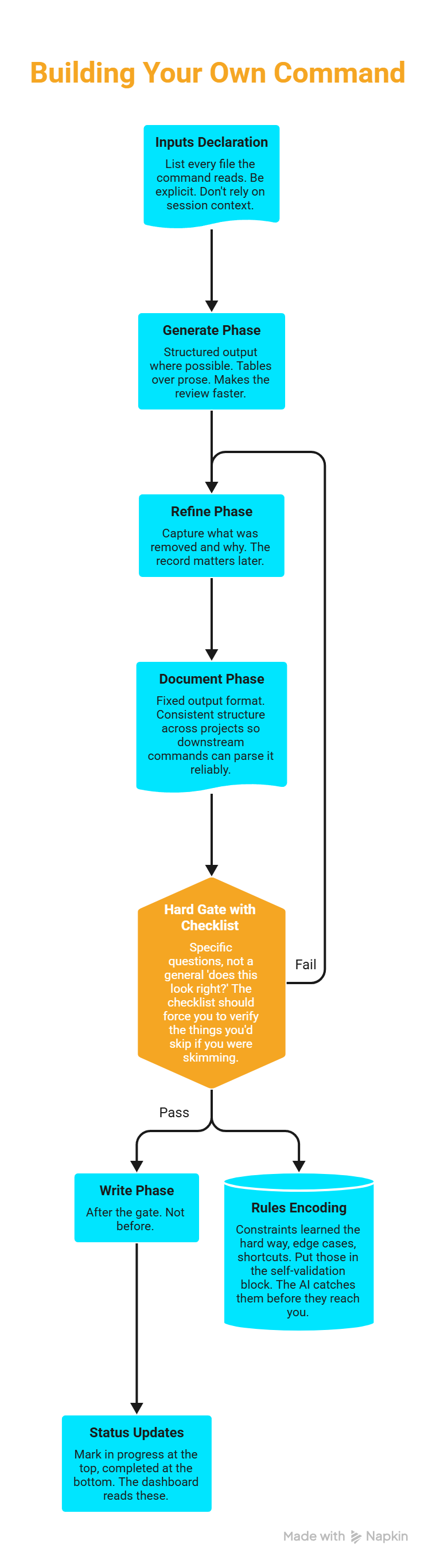
The pattern transfers to any multi-step workflow where you want AI to propose and a human to approve before anything gets written. The pieces you need:
An inputs declaration. List every file the command reads. Be explicit. Don't rely on session context.
A generate phase. Structured output where possible. Tables over prose. Makes the review faster.
A refine phase. Capture what was removed and why. The record matters later.
A document phase. Fixed output format. Consistent structure across projects so downstream commands can parse it reliably.
A hard gate with a checklist. Specific questions, not a general "does this look right?" The checklist should force you to verify the things you'd skip if you were skimming.
A write phase after the gate. Not before.
Status updates. Mark in progress at the top, completed at the bottom. The dashboard reads these.
If you're building this for a domain you know well, the rules encoding is where the real leverage is. The constraints you've learned the hard way, the edge cases that always cause problems, the shortcuts that look fine until three steps later: put those in the self-validation block. The AI catches them before they reach you.
New features on existing projects
The pipeline runs greenfield well. Most projects aren't greenfield.
When a feature arrives, open a branch, same as code. Two things are always required: requirements scoped to the feature, and an RFC. Everything else depends on what the feature touches. A new integration point gets event storming phases. A new endpoint gets an API contract update and probably an ADR. A UI change that doesn't touch the domain model needs neither.
When the feature ships, the branch merges into main. The architecture docs absorb the change the same way the codebase does.
The drift check runs at merge time. It verifies the branch artifacts are internally consistent and don't contradict main before the merge lands. If a feature ADR introduces a new bounded context that the API contract doesn't reflect, the drift check flags it before it becomes a permanent inconsistency. That's Part 3.
The collaboration model
One line in CLAUDE.md shapes how this all runs: "You are a peer Architect in a co-working session, not an assistant taking orders."
When something looks wrong, I'm not asking for a retry. I'm starting a discussion. The AI pushes back if it thinks the proposal is sound. We converge on the right answer. The commands enforce the structure. The conversation handles the judgment.
That's the division. Process enforces sequence. Model executes steps. Human approves output. None of the three does the other's job.
This is Part 2 of a 3-part series. Part 3: Architecture Drift and Deliverables.